
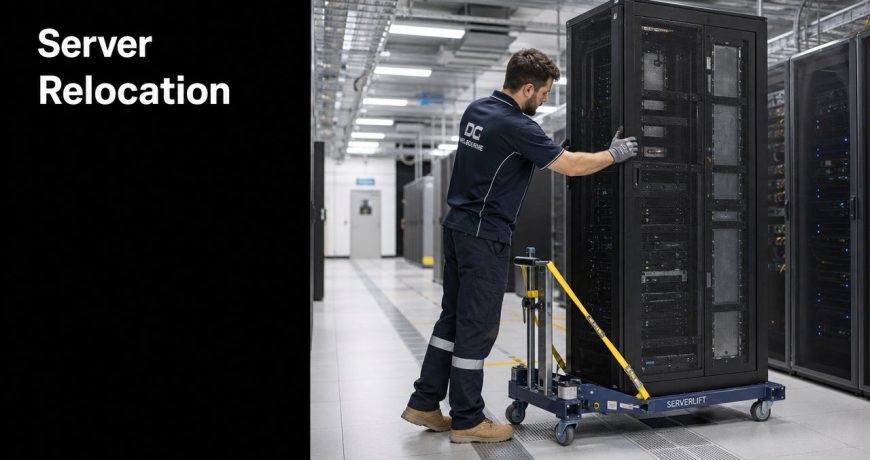
Server Relocation Specialists: Melbourne’s Expert IT Moves
An office move usually starts with the fun parts. Better layout. Better access. A chance to fix everything that never quite worked in the old space.
Then someone looks at the server room.
That's when the mood changes. Desks and chairs can be replaced. Your core systems can't be treated like ordinary office furniture, and they also can't be left to a purely technical team without a proper physical move plan. The businesses that handle this well usually accept one thing early. A server relocation is a joint operation between IT specialists and commercial movers who understand secure handling, controlled transport, access constraints, and chain of custody.
If you're preparing for your first move in Melbourne, start with a clear view of the whole job. A good definitive IT office relocation guide helps frame the technology side, while practical planning around building access, timing, lift bookings, packing, and protected transport matters just as much on move day. For the broader office move logistics around people, furniture, staging, and site readiness, it also helps to understand how experienced commercial office removalists in Melbourne approach the operation.
Your Melbourne Server Relocation Starts Here
A typical first-time server relocation looks like this. The lease end date is fixed. The fit-out team says the new office will be ready. The IT team says they can shut systems down Friday night and bring them back Sunday. Everyone assumes the move is under control until the detailed questions arrive.
Who is auditing every server, switch, UPS, firewall, patch panel, rail kit, and loose peripheral? Who confirms the new comms room has the right power and cooling? Who handles the physical lift from rack to crate to truck to rack without a drop, static event, or missing component? Who controls access to portable high-value parts while half a dozen contractors are walking in and out?
That's where many projects wobble. People treat the move as one task when it's really three linked jobs:
- Technical shutdown and recommissioning: IT staff or specialist engineers handle dependencies, services, backups, and power sequencing.
- Physical relocation: trained movers manage packing, lifting, vehicle loading, route planning, and placement.
- Site coordination: facilities, building management, and project leads keep loading docks, access windows, permits, and inductions aligned.
The safest server move isn't the one with the most people involved. It's the one where each person has a narrow, clearly defined role.
In Melbourne, that matters even more than many owners expect. CBD buildings, business parks, and mixed-use developments often add lift restrictions, after-hours access rules, loading dock booking windows, and tight delivery paths. A relocation can fail even when the IT plan is strong, because the physical transfer was treated as an afterthought.
The Foundation of a Flawless Move Pre-Move Assessment
The move is won before the first cable comes out. If the audit is weak, every later decision gets harder.
Common oversights in server relocation include inadequate auditing of existing equipment, insufficient power and cooling capacity assessment at the new site, and lack of thorough testing protocols, as outlined in this server room migration guide. Those aren't minor mistakes. They're the reason some projects arrive at the new office with nowhere safe to install critical hardware, or with gear powered on in the wrong order.
Audit what you actually own
Start with a full physical inventory. Don't rely on memory, an old asset register, or a rack diagram from two years ago.

Walk the room and document:
- Rack-mounted hardware: servers, switches, storage arrays, firewalls, PDUs, KVMs, and UPS units.
- Identity details: model numbers, serial numbers, rack positions, rail types, and asset tags.
- Connectivity: patch leads, uplinks, labelled ports, and any temporary cabling that somehow became permanent.
- Support gear: spare drives, transceivers, power leads, brackets, cages, and vendor-specific accessories.
Photograph the front and rear of each rack. Then photograph close-ups of cable paths, patching, and anything unusual. Those images save time later when the team is rebuilding under pressure.
A clean inventory also supports smarter planning around staging and office readiness. If you're coordinating the wider workplace move at the same time, these office move tips for a smoother relocation help keep the non-IT side from colliding with the server cutover window.
Check the new site like an engineer and a mover
Many teams inspect the new room and only look at bench space and rack count. That's not enough. The receiving site has to be ready for operation and ready for delivery.
Review these items before lock-in:
Power availability
Confirm the room's electrical capacity, circuit layout, UPS support, and outlet placement. A rack in the right corner is no use if the power path is wrong.Cooling and airflow
Verify HVAC capability, vent placement, airflow direction, and whether the room will hold stable conditions under live load.Access path
Measure door widths, hallway turns, lift dimensions, loading dock clearance, and any ramps or stairs between truck and comms room.Floor conditions
Check floor loading, raised floor integrity if applicable, and whether the rack positions suit both weight and cable routing.
Practical rule: if the rack can't move cleanly from truck to final position on paper, it won't move cleanly on the day.
Label for reconstruction, not just removal
The best labels answer the next question, not the current one. “Blue cable” is useless. “Rack A, U18, Switch 2, Port 14 to Firewall WAN secondary” is useful.
Use a consistent scheme for:
- Cables
- Rack units
- Power feeds
- Patching destinations
- Device sequence for reinstall
The payoff for discipline is clear. The relocation itself may be fast. Rebuilding a messy environment is what eats the weekend.
Mitigating Disaster With Risk Planning and Data Backups
The hardware gets most of the attention because it's visible. The fundamental exposure sits in dependencies, recovery options, and the decisions people make under time pressure.

According to this migration strategy analysis, approximately 90% of CIOs have experienced failed or disrupted server migration projects, and many of those issues stem from oversights in dependency mapping before the move. That figure should change how you plan. A server relocation isn't just a transport task. It's a controlled service interruption with business consequences.
Backups must be verified, not assumed
Before shutdown, confirm that backups exist, are current, and are restorable. Plenty of teams can point to a backup platform dashboard. Fewer can prove they can recover what matters within the available downtime window.
A practical risk plan covers:
- Critical systems first: identify what absolutely must return first for the business to function.
- Restore confidence: test recovery on representative systems, not just backup job completion.
- Downtime approvals: get sign-off from leadership and affected teams on what outage window is acceptable.
- Rollback criteria: define the point where you stop trying to push forward and revert to the prior state.
If the relocation involves phased timing, temporary holding, or staggered fit-out schedules, make sure your assets aren't sitting in an improvised corner of the new office. Controlled short-term storage for business relocations can be part of the risk plan when timing between departure and recommissioning doesn't line up neatly.
Dependency mapping prevents bad power-on decisions
Servers don't come back online in random order. Authentication, storage, virtualisation layers, line-of-business applications, database services, and network controls all rely on one another.
The same Auxis source notes that a focused 3-day dependency mapping exercise helps identify critical application relationships and define the right migration order. For a first-time business owner, the simplest way to understand this is to ask: what needs to be alive before users can log in, open core systems, print, transact, and work normally?
Group equipment into logical batches by application or service family. Then define:
- what shuts down together
- what travels together
- what gets racked first
- what powers on first
- who validates each stage
This short video gives a useful visual overview of controlled data centre move thinking:
If your team can't describe the reboot order clearly before move day, they're planning to improvise after the truck arrives.
Insurance and incident planning
Insurance needs a quick, plain-English review before the move. Confirm what is covered in transit, who carries that cover, and what exclusions apply to high-value technology assets. Also document who has authority to make decisions if an item is delayed, damaged, inaccessible, or fails validation after installation.
That sounds administrative. It isn't. On the day, clear authority is what stops a technical issue becoming a business crisis.
Assembling Your Melbourne Relocation Team
Businesses often make one of two mistakes. They either expect internal IT staff to handle the whole move, or they hand everything to general movers and hope the technical details sort themselves out later.
Neither approach works well.
As noted in this comparison of technical specialists and general server movers, server relocation requires specialised IT professionals to manage critical systems safely. That's the technical side. The physical side still needs people who know how to move sensitive, high-value equipment through real buildings, around real constraints, without introducing security gaps.
What IT specialists should own
The technical team should control the parts that affect service integrity:
- Decommissioning: graceful shutdown, service sequencing, and device preparation
- Backup confirmation: ensuring recoverability before any disconnect
- Configuration control: documenting existing state and post-move changes
- Recommissioning: reracking logic, cabling validation, and power-on sequencing
- Application testing: confirming systems work for users
These are not jobs for standard office removal crews.
What commercial movers should own
Experienced movers should manage the physical workflow:
- Access planning: loading docks, elevators, inductions, permits, and route protection
- Handling: lifting, packing, staged loading, secure transport, and controlled unloading
- Protection: anti-static materials, blankets, straps, cages, and vehicle restraint
- Chain of custody: who touched what, when it moved, and where it went
- On-site coordination: timing with facilities, fit-out teams, and building managers
A relocation team is strongest when these responsibilities don't overlap in a messy way.
The security gap many businesses miss
Technical content about server moves usually focuses on climate, shock, and equipment protection. That's necessary, but it misses a quieter risk. According to this server room move resource, 18% of IT asset losses result from internal theft or unverified staff, and using movers with police-checked staff can reduce this specific risk by as much as 72%.
That matters because not every loss is dramatic. A missing drive, RAM stick, access device, or boxed peripheral can disappear during a busy move and go unnoticed until well after handover.
Choose a moving team the same way you choose a keyholder. The issue isn't only whether they can lift the gear. It's whether they should be trusted near it.
For businesses comparing providers, vetted local business moving companies near me are worth reviewing with that security lens in mind, not just on price or truck size.
Server Relocation Vendor Checklist
| Verification Point | Why It Matters | Ideal Answer |
|---|---|---|
| Technical shutdown responsibility | Prevents confusion over who powers down and disconnects production systems | Named IT specialist or internal technical lead owns shutdown and recommissioning |
| Physical handling experience | Sensitive hardware needs different treatment from desks and filing cabinets | Demonstrated experience with server and comms equipment moves |
| Staff screening | Reduces exposure to theft and chain-of-custody problems | Police-checked staff with clear site access controls |
| Insurance cover | Protects the business if goods are damaged in transit or handling | Active transit and liability cover appropriate to commercial relocations |
| Equipment used | Shows whether the mover is prepared for delicate, heavy technology assets | Protective packing systems, lifting gear, ramps, restraints, and secure vehicles |
| Site planning process | Identifies access issues before move day | Pre-move inspection of both sites and written logistics plan |
| Labelling and tracking method | Prevents misplaced assets and messy reinstalls | Itemised, rack-aware labelling and documented movement control |
| Post-delivery scope | Clarifies where moving responsibility ends | Defined placement, staging, unpacking, and handover process |
The Physical Move Packing and Transport Best Practices
A standard office move rewards speed. A server move rewards control.
Professional data centre relocation companies execute migrations daily, using specialised server-handling devices and insured, experienced staff to manage complex IT infrastructure moves far more efficiently and safely than internal teams, according to this data centre relocation overview. That matters because server hardware is awkward in exactly the wrong ways. It's dense, fragile, valuable, and often mounted in spaces that were never designed for easy removal.
How proper preparation looks on the floor
Before anything is lifted, the equipment should be shut down, isolated, and labelled in a way that supports reinstallation. Rails, blanks, loose drives, power cords, and transceivers need to be accounted for before they become a box of unidentified parts.

Good physical handling usually includes:
- Anti-static protection: for components and packed equipment where electrostatic discharge is a risk.
- Shock-absorbent packing: to reduce vibration and impact during loading and transport.
- Secure containment: crates, cages, or purpose-built packing systems that stop movement in transit.
- Controlled lifting: assisted lifting devices, ramps, and lift gates rather than improvised manual handling.
If your wider commercial move includes fragile monitors, AV gear, or specialist electronics alongside the server environment, these packing tips for fragile items during a move are useful for keeping standards consistent across the project.
Packing mistakes that create work later
The most common transport problem isn't always visible damage. It's disorganisation.
Avoid these mistakes:
Leaving cables loose and unidentified
That saves five minutes during removal and can cost hours during reinstallation.Packing mixed components together
Keep related rails, screws, faceplates, and accessories with the relevant device or rack group.Loading by convenience instead of sequence
Equipment that must be installed first shouldn't be trapped behind lower-priority items.Using general office packing materials alone
Standard cartons and wraps are not enough for dense rack equipment unless they're part of a controlled packing method.
Hardware survives transport best when the packing method matches the way the item will be lifted, restrained, unloaded, and re-racked.
Execution and Validation Minimising Downtime
Move day should feel boring. That's usually the sign that the planning held.
A clean run follows a written sequence, not verbal memory. Everyone on site should work from the same run sheet, including the technical lead, move supervisor, facilities contact, and any building representative controlling dock or lift access.
A practical move-day schedule
Use a low-impact window if you can, often after hours or over a weekend. Then work in order:
Final confirmation
The team checks backups, confirms labels, verifies the destination room is ready, and confirms access paths are clear.Sequenced shutdown
Systems come down according to the dependency plan. Nothing is unplugged early because someone wants a head start.Physical removal and transport
Equipment is de-racked, packed, loaded, and moved according to the pre-assigned sequence.

Placement and reracking
Hardware goes straight to planned rack positions or a clearly marked staging area if reracking is delayed.Power-on in controlled order
Core infrastructure starts first, followed by dependent services and then user-facing systems.
Validation must go beyond a quick ping
Rushed moves reveal their vulnerabilities. A green power light doesn't mean the business is ready.
The same JK Technology Services guidance referenced earlier outlines a 10-step process that includes powering on, validating functionality, and post-migration support, with specific emphasis on *automated validation tools rather than manual "select " queries to avoid data discrepancies. That's the right mindset. Validation should test the business outcome, not just the device state.
Use layered checks:
- Infrastructure checks: power, link lights, storage visibility, and basic connectivity
- System checks: virtual hosts, authentication, backups, and scheduled services
- Application checks: line-of-business systems, file access, print workflows, and remote access
- User checks: key staff test the functions they rely on to do actual work
The move isn't finished when the last rack is bolted in. It's finished when users can do their jobs without hidden faults surfacing on Monday morning.
Keep one issue log during validation. Assign each fault to a named owner with a decision deadline. That prevents the familiar post-move drift where everybody assumes someone else is handling it.
Post-Move Success and Final Support Checks
The first week after the move tells you whether the relocation was merely successful on paper or truly stable in operation.
Leading server relocation specialists provide extensive post-move services, including asset auditing, reinstallation, and even environment redesign to ensure the new setup is optimised for performance and reliability, as described in this data centre relocation service overview. That post-move attention matters because relocation often exposes weaknesses that were easy to ignore in the old site.
What to review in the first week
Don't treat handover as the finish line. Review the environment daily at first.
- Environmental conditions: confirm temperature, airflow, and room behaviour under normal workload.
- System logs: check for hardware alerts, storage warnings, failed services, and unstable links.
- Documentation updates: revise rack layouts, patching records, asset lists, and recovery procedures.
- Support ownership: make sure staff know exactly who to call for moving issues, technical faults, and facilities problems.
Use the move to improve the room
A relocation is one of the few times a business gets a clean look at its infrastructure. Use that opportunity. Retire dead hardware. Fix inconsistent labelling. Clean up cable paths. Review where security controls were weak. Confirm the new room supports future maintenance, not just day-one operation.
That's the primary benefit of using server relocation specialists and disciplined logistics together. You don't just get the same setup in a new address. You get a more organised, more supportable environment.
If you're planning an office move and need a team that understands the physical, operational, and security demands around sensitive business assets, Get n Go Removals Melbourne is well worth contacting. Their commercial moving experience, police-checked staff, insured service, careful handling, and Melbourne-based coordination make them a practical partner for businesses that want the move run properly from first inspection to final placement.