Office Relocation Plan How to Move Without Downtime
You usually notice the need for an office relocation plan when the lease date is suddenly close and people start talking about crates, labels and truck access. By then, the risk isn't the move itself. It's the Monday morning after, when staff arrive, the internet isn't live, the meeting room screen won't connect, and half the team still doesn't know where to sit.
That's why the strongest office moves don't start with packing. They start with decisions. How much space do you need now. Which teams need fixed desks, which need project space, and what can't go offline even for a few hours. In Melbourne, those questions matter more than they used to because businesses aren't moving for one reason anymore. They're resizing, consolidating, reconfiguring for hybrid work, or using a lease event to reset how the office operates day to day.
Why Your Office Relocation Plan Matters More Now
Friday 4:30 pm. The removal crew has finished, the desks are built, and the new tenancy looks ready. By 9:15 Monday, test starts. Staff cannot connect to Wi-Fi, the boardroom screen will not talk to laptops, building passes have not been activated, and the team meant to answer clients is standing around waiting for fixes.
That is what separates a move that looks finished from one that is ready to trade on Day 1.
The reason this matters more now is that Melbourne businesses are not relocating for one simple reason anymore. Many are using a lease event to cut wasted space, reset for hybrid attendance, bring teams together on fewer floors, or swap rows of desks for more meeting, project and quiet rooms. Analysts at JLL found Australia's national CBD office vacancy rate rose to 14.9% in 2023, the highest level since 1995, while occupied stock across CBD markets was unchanged year on year, according to JLL's reading of Australia's office markets. That combination changes the brief. Planning is now driven by rightsizing and workplace function, not just headcount growth.
Melbourne is feeling that pressure directly. In the December 2025 update, KPMG reported Melbourne CBD office vacancy at 18.4%, above Sydney at 14.3% and Brisbane at 10.4%, while national CBD office occupancy had improved but was still below pre-COVID levels in early 2024, according to the KPMG commercial property market update. In practice, that means more choice in the market, but it also means more temptation to take space that photographs well and fits poorly.
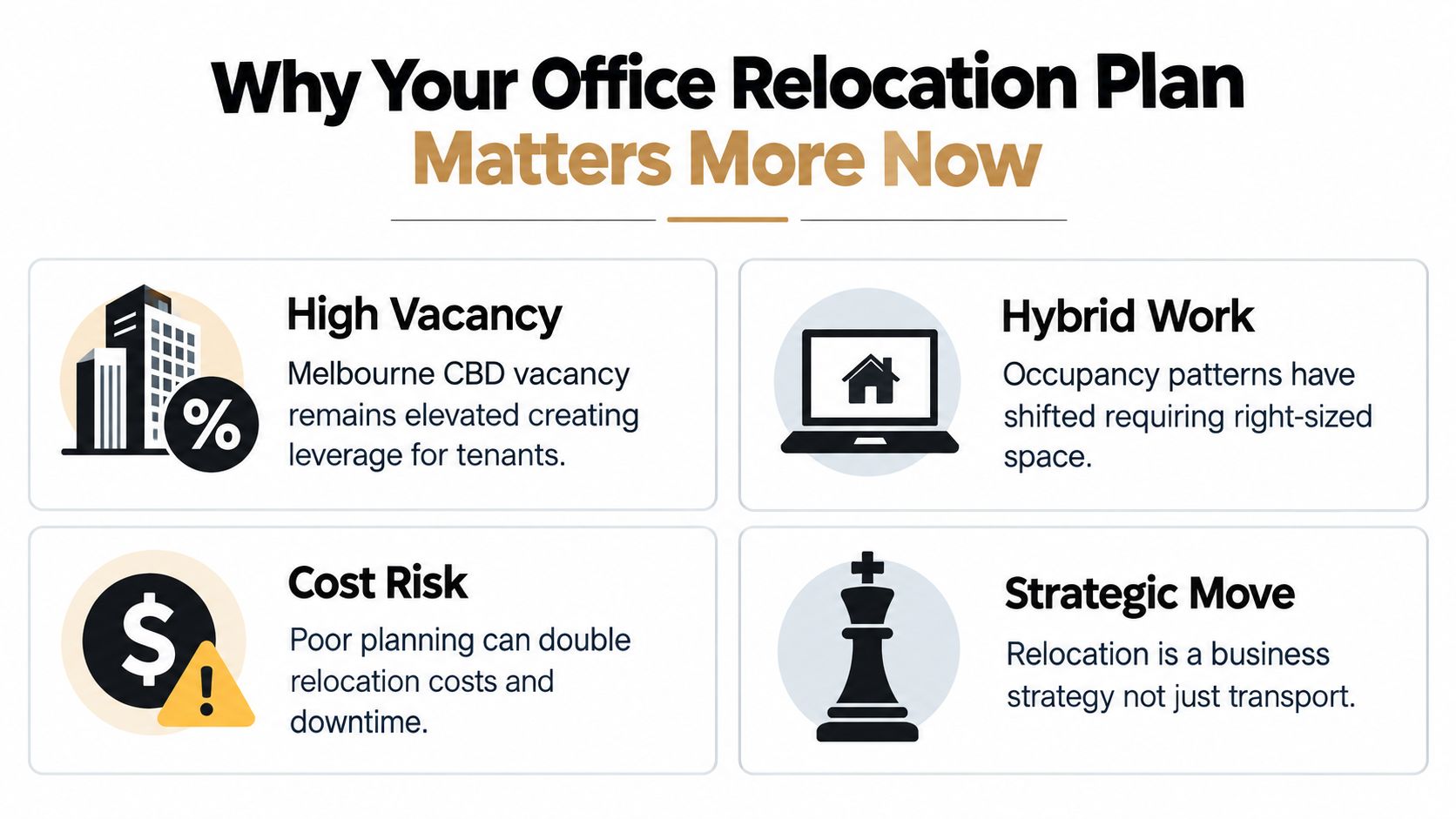
The planning problem has also changed shape. The physical move, the workplace setup, and the staff change process can run together. IT cannot. Internet activation, comms room readiness, access control, printer deployment, telephony, and meeting room tech sit on their own critical path, and they are usually what delay reopening if no one is driving them hard enough.
That is why the better relocations run as parallel workstreams under one accountable lead. One person needs authority to make trade-offs on timing, budget, and scope. IT then runs as a separate stream with its own milestones, because a finished fitout does not help if the network is not live.
A few decisions now have a larger impact than they did a few years ago:
- Space assumptions need testing: Hybrid attendance rarely matches the old one-desk-per-person model.
- Floor plans affect delivery: Desk ratios, quiet rooms, storage, and collaboration areas all change cabling, furniture counts, and move sequencing.
- Day 1 readiness depends on dependencies: Building access, inductions, loading dock bookings, and carrier lead times can delay a reopening more than the truck schedule.
- The cheapest layout is not always the cheapest move: Reusing furniture can save capital, but it can also add labour, storage, and reconfiguration time.
Commonwealth office reporting points the same way. Occupational density shifted from 13.1 m² per work-point in 2024 to 12.5 m² in 2025 across larger non-corporate Commonwealth tenancies, as noted earlier in the JLL analysis. The practical point is straightforward. Density assumptions are moving, and those assumptions flow straight into furniture, power, meeting rooms, lockers, and circulation space.
A good plan gets those calls made early enough to protect operations, not just the move date. If you are reviewing delivery options, office relocation services in Melbourne are most useful when they support that wider project structure and understand that reopening the business matters more than getting boxes through the door.
Building Your Timeline and Project Team
A move starts to drift long before the first crate turns up. It usually happens when lease dates are locked, but no one has authority to settle scope, sign off spending, or force decisions across IT, workplace, and operations.
That risk is higher now because many Melbourne moves are not simple expansions. Higher vacancy across parts of the market and changing attendance patterns mean businesses are reworking footprint, desk ratios, meeting rooms, and storage at the same time they are relocating. Rightsizing sounds efficient on paper. In practice, it adds decisions that can stall the program if one person is not running the whole sequence.
Appoint one lead, then split the work
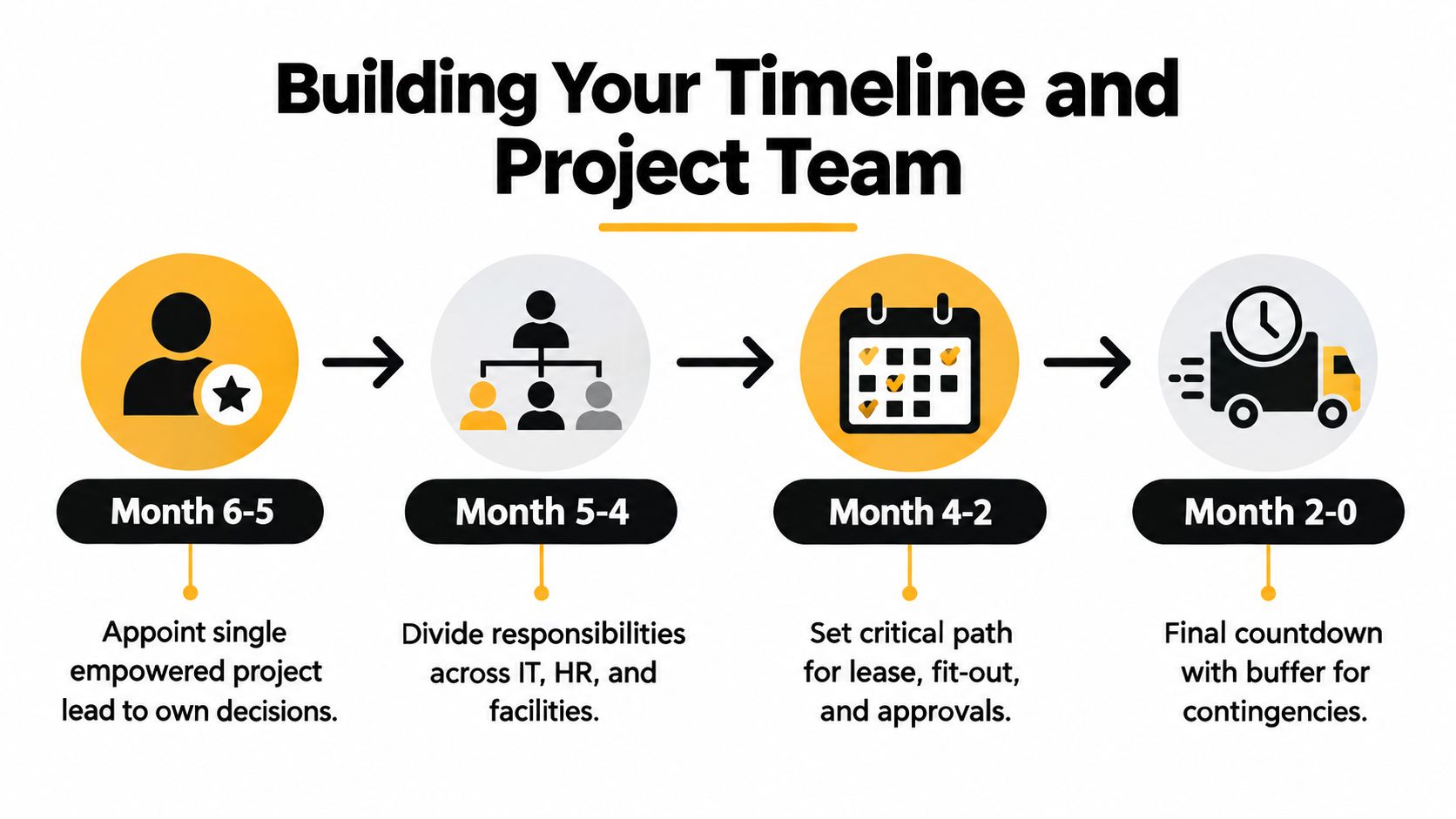
One project lead should control the timeline, chase approvals, and resolve conflicts between workstreams. That person does not need to physically manage every task. They do need clear authority from leadership, because relocation delays usually come from unresolved decisions, not from labour on move day.
The structure that works best is simple. One lead owns the master program. Separate owners run each stream underneath it, with IT treated as its own critical path from day one. Upmove makes a similar point in its office relocation guide for Australia, which stresses early planning across floor plans, services, safety and access.
| Workstream | Primary owner | Typical decisions |
|---|---|---|
| Move governance | Project lead | Budget approvals, timeline control, escalation |
| IT and connectivity | IT manager or external provider | Internet activation, telephony, hardware cutover |
| Furniture and workplace | Facilities or workplace lead | Reuse, new purchases, storage, reconfiguration |
| People and communications | HR or operations | Staff notices, neighbourhoods, Day 1 instructions |
| Building coordination | Facilities or project lead | Access cards, loading dock bookings, lift use, inductions |
This split matters because a hybrid reconfiguration creates competing priorities. Finance may want to reuse furniture. Team leaders may want more focus rooms. IT may need a different desk layout to support docks, screens, and meeting room hardware. Someone has to call the trade-off early, or the schedule slips while everyone waits for a better option.
Set the timeline from operational readiness
Build the program backwards from the first productive working day in the new office. That date is more useful than the truck date because it forces the team to focus on what needs to work when staff arrive.
Earlier guidance in this article already notes that commercial relocations often need several months of planning, especially when fit-out, approvals, staged handover, or interstate coordination are involved. The practical rule is straightforward. If the office is being redesigned for hybrid use rather than copied as-is, start earlier than a straight like-for-like move.
A workable sequence looks like this:
- Lease confirmed: assign the project lead, confirm budget controls, and lock long-lead items.
- Space plan approved: finalise team locations, workstation counts, meeting rooms, storage, and shared areas.
- Owners assigned by workstream: set deadlines for IT, furniture, people communications, and building access.
- Dependency dates fixed: approvals, deliveries, service activation, and access windows go into one master schedule.
- Move weekend mapped: crate drop, labelling, supervision, and sequencing are documented in detail.
- Day 1 sign-off completed: the new site is checked against a reopening list, not a removalist checklist.
Good timelines show dependencies, not just tasks. "Book movers" is too loose to manage risk. "Book movers after loading dock approval, after crate numbers are confirmed, and before internal packing starts" gives the team something they can act on.
For teams that want a cleaner way to map approvals and handover points, the guide from Partitioning Services Limited is useful because it focuses on sequencing rather than treating relocation as a single event.
Build slack into the schedule
Compressed cutovers cause more trouble than people expect. If one office shuts on Friday evening and the new one must be fully usable on Monday morning, any late access approval, incomplete patching, missing furniture parts, or delayed carrier handover can push reopening off course.
Leave room for those failures in the master plan. I usually want buffer around access, IT testing, and furniture reassembly first, because those are the issues that keep staff from working even when everything else looks finished.
A written schedule is easier to control than messages scattered across email and chat. If you need a starting point, this office move project plan template gives you a practical structure for dates, owners, and dependencies in one place.
Coordinating IT Furniture and Building Logistics
Most office moves don't reopen late because the truck was slow. They reopen late because three separate workstreams were treated as one checklist item.
IT, furniture and building logistics need to run in parallel. Each has different owners, different lead times and different failure points. If one slips, the others can still appear complete while the office remains unusable.
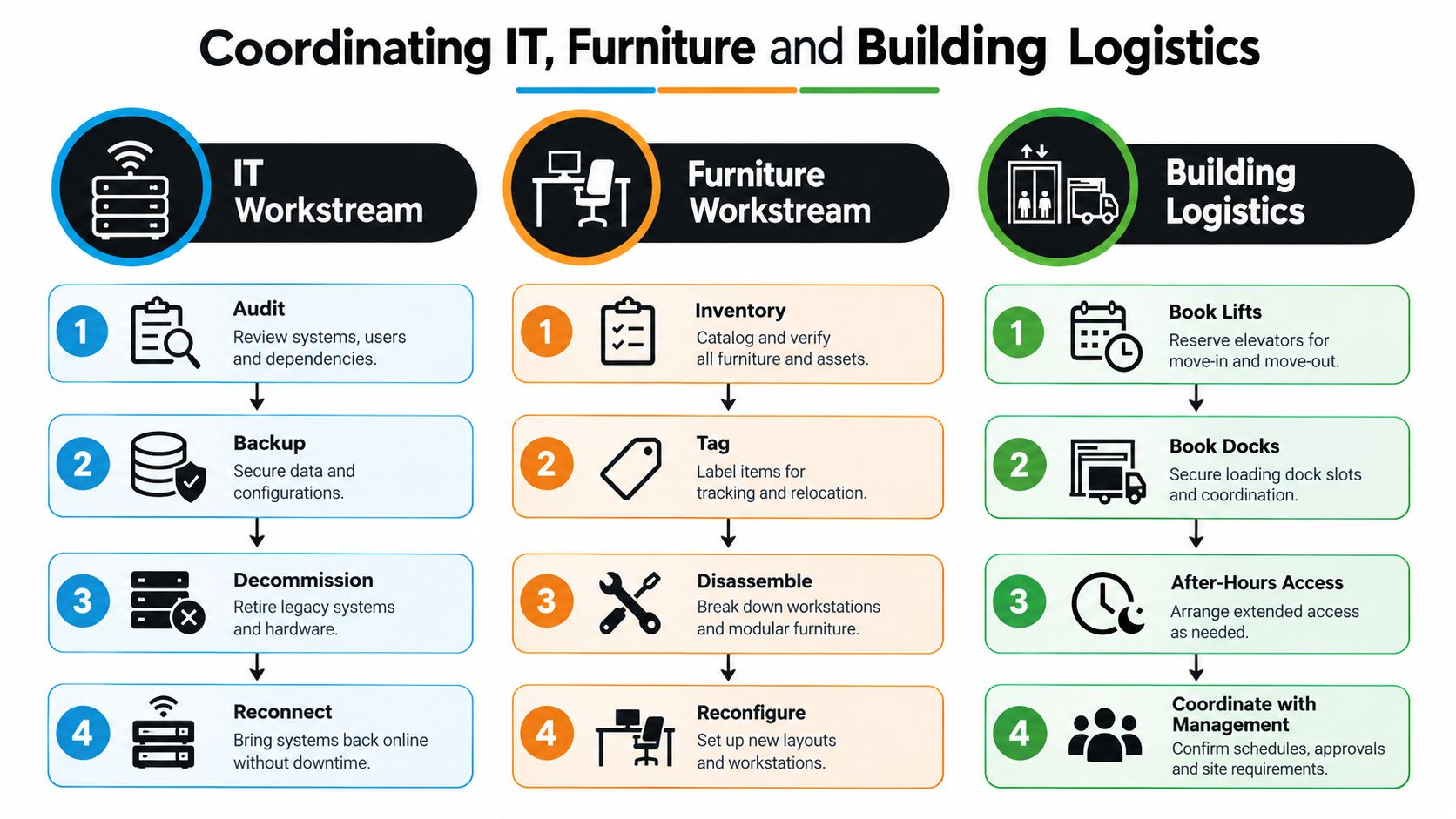
IT is its own critical path
Australian guidance repeatedly stresses treating IT, network and telephony as a separate critical path, alongside early site inspections for access constraints, lift bookings and compliance requirements in the Easy Move Services office relocation project guide. That's the right approach because tech failures usually don't show up until people try to work.
The minimum pre-move checks should include:
- Connectivity readiness: Confirm internet activation dates, handover points, Wi-Fi coverage and meeting room connection needs.
- Device mapping: Match each workstation, screen, dock and phone to a destination seat or team zone.
- Cutover sequence: Decide what stays live until the last minute and what can be powered down earlier.
- Backup and recovery: Make sure critical data and systems can be restored if the cutover goes sideways.
A broader guide from Nutmeg Technologies is a useful companion because it forces teams to think through testing, inventory and service continuity before move weekend.
Here's a practical walk-through of the handover process:
Furniture has to match the new operating model
A lot of wasted effort comes from moving everything by default. That made sense when offices were expanding in a straight line. It doesn't make sense when the new space is being reconfigured around hybrid attendance, project zones or fewer enclosed offices.
The better method is to audit furniture in three groups:
| Category | What to do |
|---|---|
| Keep and relocate | Tag by destination, check dimensions, plan disassembly |
| Modify or combine | Reuse workstations, storage or meeting furniture in new layouts |
| Exit before move day | Dispose, donate, store or recycle so it doesn't clog the loading plan |
If specialist handling is required for servers, monitors, comms cabinets or bulky workplace equipment, office equipment relocation support can be used as one part of the wider move program, provided it's tied to the same schedule and site plan.
Building logistics decide whether the schedule is real
Many neat project plans collide with the actual building. Lift bookings are limited. Loading docks have windows. Access cards may not be issued until tenancy paperwork clears. Some sites allow weekend moves but restrict noise, rubbish or contractor access.
The move is not ready when the truck is booked. It's ready when the building manager, the IT team and the floor plan all agree on the same timeline.
A Day 1 walk-through before staff arrive is one of the most effective controls in any office relocation plan. Test a sample of workstations. Check meeting room screens. Confirm kitchen power, printer placement, swipe access and bathroom access. You're not looking for perfection. You're looking for the faults that stop people working.
Managing Vendors Compliance and Communication
A move can look organised on paper and still fail on handoffs.
The usual pattern is simple. The removalist arrives inside the booked dock window, but the goods lift has not been released. The electrician has finished, but the comms cabinet cannot be patched because the carrier booking shifted. The old site cleaner is waiting on make-good instructions, while the landlord is waiting on the final scope. Each vendor may be doing their part. Reopening still slips because nobody is controlling the joins between workstreams.
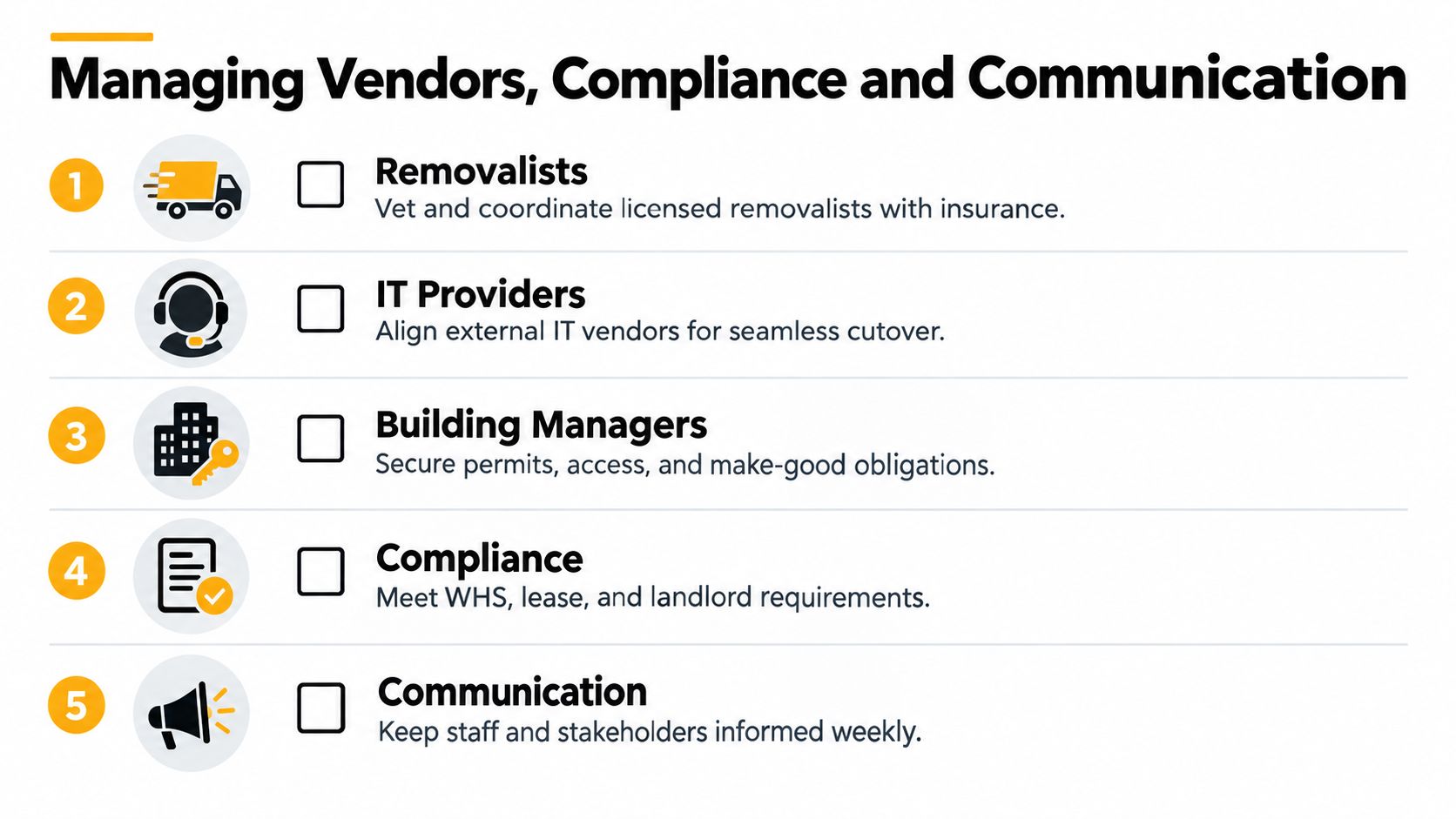
One coordinator, separate workstreams
With Melbourne tenants rethinking footprint, desk ratios and hybrid layouts, vendor management now starts earlier than it used to. A rightsizing move often means concurrent changes to joinery, storage, meeting rooms and acoustic treatment. That creates more interfaces, not fewer. IT also runs on its own critical path, because carrier dates, cutover testing and device staging rarely line up neatly with furniture install or physical move day.
The coordination model needs to reflect that reality.
| Coordination model | What works | What usually goes wrong |
|---|---|---|
| Single point of contact | Faster decisions, one schedule, clear escalation | The lead needs clear decision authority and fast access to budget holders |
| Split by department | Teams keep technical detail close to the work | Building, furniture and IT dependencies get missed between handoffs |
For most office relocations, one lead with named owners for IT, facilities, furniture and people communications is the safer setup. Department heads still approve their own issues, but one person controls sequence, exceptions and vendor follow-up.
If outside movers are involved, business moving companies in Melbourne should receive more than a date and address. They need the dock booking, lift rules, floor plan, staged priorities, contact list and a clear note on what must land first for Day 1 trading.
Compliance work that gets left too late
Compliance delays rarely look dramatic until the final week. They sit in email threads, lease schedules and building portal requests, then surface all at once.
Focus on the items that can block access, handover or trading:
- Building approvals: Confirm lift bookings, loading dock windows, after-hours access, inductions, parking rules and security passes for every vendor.
- Lease and make-good scope: Agree in writing what is being removed, patched, repainted, cleaned or reinstated at the old premises.
- Address and registration updates: Update regulators, insurers, banks, suppliers and key customers within the required timeframes noted earlier in the article.
- Workplace obligations at the new site: Check fire warden coverage, evacuation diagrams, accessibility, first aid points and any base-building induction requirements.
On-site check: Walk both buildings with the building manager and your lead contractor. Measure door clearances, inspect dock access, confirm trolley routes and check whether the goods lift needs protective padding booked in advance.
That last point catches people regularly. A move can be fully packed, labelled and staffed, then lose half a day because the building requires extra lift protection, a different arrival sequence, or a contractor induction that was assumed rather than booked.
Communication should be operational, timed and specific
Staff updates work best when they answer the next practical question. Too much narrative and not enough detail creates noise.
Use a short sequence tied to decision points:
- Initial notice: Reason for the move, expected timing, what changes for teams, what stays the same.
- Operational note before move week: Packing rules, label format, clear desk deadline, asset handling and support contacts.
- Vendor confirmation pack: Final run sheet, site contacts, access windows, induction status, delivery order and escalation path.
- Day 1 note: Entry point, access method, team neighbourhoods, meeting room booking process, printer locations and how to report faults.
IT suppliers need tighter communication than most other vendors because their delays are less visible until people try to work. Good vendor control means written handoff points, test dates, response times and one owner for unresolved issues. The Finchum Fixes IT vendor management advice is useful here because it focuses on ownership and communication discipline, which is where many office moves come unstuck.
Avoiding Downtime and Common Relocation Risks
At 8:30 on a Monday, the new office can look ready and still be unworkable. Desks are in. Screens are on arms. The kitchen is stocked. Then the first team arrives and finds the guest Wi-Fi is the only live connection, the meeting room panels are offline, and access cards have not been released at the speed gates.
That is what downtime looks like in practice. The move crew has finished, but the business has not reopened.
The pattern is consistent across office relocations. Delays come from dependencies between workstreams, especially where one team assumes another has signed something off. IT sits on its own critical path because a room full of installed furniture does not help if internet, switching, patching, printing, access control, and meeting room tech are not tested in sequence. One project lead needs authority to call those dependencies out early, hold owners to dates, and protect the reopening window when trade-offs appear.
Same-day cutovers can work, but only when the scope is tight and the fallback plan is real. For larger moves, the safer approach is to set a reopening window, decide what must be live for Day 1, and treat the rest as staged completion.
A short risk matrix to prevent downtime
| Risk | What it looks like on the day | Prevention | Owner |
|---|---|---|---|
| Carrier activation slips | Staff can log in locally but cannot work online | Get activation dates in writing, confirm service IDs, test before move day | IT lead |
| Patching mismatch | Workstations are built but ports do not map to the desk plan | Check the comms rack, floor boxes and seating plan against each other before furniture install | IT lead, fitout team |
| Access control delay | Staff wait at reception or doors stay locked | Pre-load cards, confirm user lists, issue temporary access for Week 1 | Building liaison |
| Dock or lift conflict | Trucks queue and the move sequence breaks | Reconfirm bookings, protection requirements and loading order 48 hours out | Project lead |
| Furniture lands in the wrong zone | Teams have seats but not the layout they were promised | Mark neighbourhoods on the floor, stage by area, verify counts before dispatch | Facilities lead |
| Old-site closeout pulls focus | The handover team is dealing with cleaners, make-good and keys while the new office has open faults | Split old-site closeout from new-site operations on move day | Project lead |
Melbourne tenants are planning moves differently now because the brief has changed. Analysts at HTW reported 13.7% CBD vacancy in January 2025, with Melbourne at 18%, and noted mixed tenant behaviour in their March 2025 office market review. Some occupiers are still expanding. Others are trimming excess space or reworking the office around hybrid attendance, more shared settings and fewer permanently assigned desks.
That changes risk planning. Rightsizing creates a denser dependency map than a simple expansion because the move is not just volume. It is also reconfiguration. Teams need the right mix of focus desks, collaboration space, lockers, storage, print points and meeting rooms on Day 1. If those settings are wrong, productivity drops even when the move itself runs on time.
For comms rooms, racks or live infrastructure, specialist handling should sit inside the main program, not beside it. Bringing in server relocation specialists early helps align shutdown windows, transport method, recommissioning order and post-move testing with the broader reopening plan.
A few controls prevent most avoidable downtime:
- Define minimum viable operations: Decide what must work by first arrival. Usually internet, Wi-Fi, access control, a tested printer, live meeting rooms and a support desk.
- Run a live readiness check: Test a sample of desks, one boardroom, guest access, printing and mobile reception before staff arrive.
- Keep defects visible: Use one fault log with owner, priority and close time. Verbal updates get lost fast on move day.
- Protect the IT path: Do not let furniture, styling or last-minute layout changes disrupt cabling, rack access or test windows.
- Stage teams where needed: If one floor or neighbourhood is fully ready first, bring that group in and hold the rest until the space is usable.
Calm relocations are not problem-free. They reopen on time because the likely failures were identified early, assigned to the right owner, and contained before they stopped work.
Settling In and Making Your New Office Work
Move day is only the handover. The office becomes useful in the first week, when people start working the space the way they really use it.
That's when you find out whether the collaboration area is in the right place, whether acoustics in the meeting rooms are acceptable, whether the lockers are enough, and whether the kitchen location creates a queue through a work zone. None of that is a failure. It's normal. The mistake is treating the layout as finished before the team has used it.
The first week checklist
A structured follow-up keeps small issues from lingering.
- IT verification: Confirm internet stability, printers, meeting room screens, phones, Wi-Fi reach and access control.
- Workstation usability: Check monitor setup, cable safety, ergonomics and any accessibility adjustments.
- Address housekeeping: Confirm website, invoices, stationery, delivery points and mail redirection are correct.
- Vendor closeout: Match invoices to scope, record damages if any, and finalise insurance or claims promptly.
- Staff feedback: Ask what's slowing work down, not what they “think of the office”.
Staff usually identify the real snags quickly. Listen for repeated friction points, especially around acoustics, storage, meeting rooms and login delays.
Capture the lessons while they are fresh
The strongest office relocation plan leaves behind a better operating playbook. Keep the final floor plan, vendor contacts, access notes, move-day issue list and post-move fixes together. The next time the business expands, consolidates or opens another site, that record saves time and prevents repeated mistakes.
This is also the right moment to review whether the office matches the reason you moved in the first place. If the goal was rightsizing, check how often desks are used. If the goal was collaboration, review whether the shared zones are being adopted. If the goal was a cleaner client experience, test reception flow and meeting room readiness.
A successful move doesn't just minimise disruption. It gives the business a space that works better on ordinary Tuesdays, not only on opening day.
Get n Go Removals Melbourne handles the practical moving side of office relocations, including packing, furniture disassembly and reassembly, transport, storage and coordination around tight building access windows. If you're building an office relocation plan and want help turning it into a staged, workable move program, visit Get n Go Removals Melbourne.